
What Is PDF Remediation and What Does It Actually Involve?
A Comprehensive Guide
Contact us to discuss your PDF Remediation requirements.
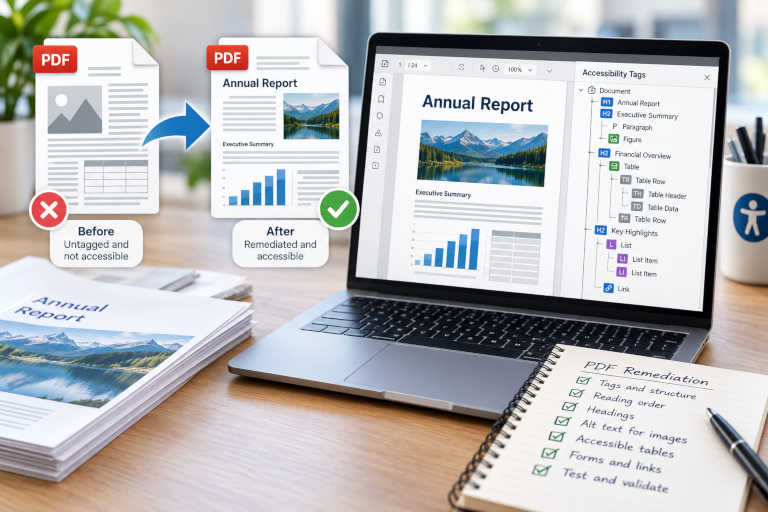
PDF remediation is the process of identifying and correcting accessibility barriers within a PDF document so that its content can be more effectively understood, navigated and used by people with disability.
At first glance, this can sound relatively simple. Add accessibility tags, run a checker and fix whatever errors appear.
In practice, effective PDF remediation can involve much more.
A PDF may need its underlying structure repaired, its reading order corrected, images described, tables rebuilt, forms labelled and scanned text recognised. Problems within the original visual design may also need to be addressed before an accessible PDF can be produced.
This article explains what PDF remediation involves, why automated fixes are rarely the whole solution and when professional PDF remediation services may be appropriate.
What Is PDF Remediation?
PDF remediation is the process of modifying an existing PDF to remove or reduce barriers that can prevent people with disability from accessing its content.
Many of these barriers are invisible to someone reading the document visually.
For example, a PDF may appear to contain:
a clear title;
logical headings;
neatly formatted paragraphs;
bullet lists;
well-designed tables;
photographs and diagrams; and
links to useful information.
However, the underlying document might tell a screen reader something very different.
The title may simply be large bold text rather than a heading. Lists may contain no meaningful list structure. A table may be announced as an unrelated sequence of words and numbers. An image may provide important information without any alternative text.
PDF remediation addresses this underlying accessibility information as well as other barriers within the document.
Adobe explains that document structure tags help assistive technologies identify elements such as headings, paragraphs, sections and tables and determine an appropriate reading order. (Adobe – Accessibility features in PDFs)
Why Do PDFs Need Remediation?
PDFs are often created primarily with visual presentation in mind.
A designer can arrange content so that its relationships are immediately obvious to someone viewing the page. Assistive technology cannot necessarily infer those same relationships from appearance alone.
Problems can also arise during conversion from the original source document into PDF.
For example:
heading information may be lost or incorrectly transferred;
content may appear in the wrong reading order;
tables may not convert with the required structure;
graphical elements may be included unnecessarily in the tag tree;
form fields may not have meaningful labels;
images may be missing text alternatives; and
complex page layouts may produce an incorrect document structure.
Older documents can present additional problems because they may have been created before accessibility was considered.
Scanned PDFs can be particularly problematic. A scanned page may look like ordinary text to a sighted reader but actually consist of a single image. Unless Optical Character Recognition (OCR) has been applied, assistive technology may have no text available to read.
W3C’s PDF accessibility techniques specifically cover areas including reading order, image alternatives, tables, OCR, headings, forms and links. (W3C – PDF accessibility techniques)
What Does PDF Remediation Involve?
The work required depends on the individual document.
A simple text-based PDF may require relatively little intervention. A designed annual report containing tables, charts, multi-column layouts and infographics can require considerably more.
Professional PDF accessibility remediation may involve some or all of the following areas.
1. Reviewing the Existing PDF
Before beginning remediation, it is useful to understand how the document has been constructed and what accessibility information already exists.
An initial review may examine:
whether the PDF is tagged;
the quality of the existing tag structure;
heading hierarchy;
reading order;
images and alternative text;
tables;
lists;
links;
bookmarks;
forms;
document properties;
scanned content;
visual design; and
the availability of the editable source document.
Running an automated accessibility checker can help identify some technical problems, but it is only part of this assessment.
Some issues require a person to determine whether the existing accessibility information is actually meaningful.
For more information, see How Do You Know if a PDF Is Accessible?.
2. Creating or Repairing the PDF Tag Structure
Tags provide semantic information about the content within a PDF.
They can identify elements such as:
headings;
paragraphs;
lists;
list items;
tables;
table headings and cells;
figures;
links;
quotations; and
other document elements.
The tags are organised into a structure tree that helps compatible assistive technologies understand how the content relates.
An untagged PDF may need an initial tag structure created. An already tagged document may still require extensive correction.
Common problems include:
incorrect tags;
missing tags;
unnecessary tags;
empty tags;
duplicated content;
improper nesting; and
content appearing in the wrong part of the structure tree.
Automatic tagging can provide a useful starting point, particularly for simpler documents, but it does not remove the need for review.
We discuss this process in more detail in How to Tag a PDF for Accessibility – and Why Tagging Alone Is Not Enough.
3. Correcting the Heading Structure
Headings do more than make a document visually attractive.
A meaningful heading hierarchy provides structure that can help people understand and navigate the content.
For example, a document might contain:
H1 for the document title;
H2 for major sections; and
H3 for subsections within those sections.
Simply making text large, bold or a different colour does not make it a structural heading.
During PDF document remediation, headings may need to be identified correctly within the tag structure and checked to ensure that the hierarchy accurately represents the organisation of the document.
4. Repairing the Reading Order
Reading order determines the sequence in which content is presented to assistive technologies.
This can become particularly important in pages containing:
multiple columns;
sidebars;
text boxes;
captions;
footnotes;
tables;
forms;
charts; or
complex graphical layouts.
Imagine a two-column report.
A sighted reader naturally reads down the first column and then moves to the second. If the underlying PDF structure alternates between the two columns line by line, a screen reader may present the content in an order that makes little sense.
W3C identifies correct reading and tab order as a specific PDF accessibility technique, while Adobe provides tools for manually inspecting and repairing reading order. (W3C – Ensuring correct tab and reading order)
Reading order therefore needs to be evaluated rather than assumed from the visual appearance of the page.
5. Remediating Lists
Lists also require meaningful structure.
A visual bullet or number on the page does not necessarily mean the PDF contains an accessible list.
A properly structured list needs to identify the list itself and its individual list items. Depending on the structure, the bullet or number and its associated content may also need to be represented appropriately.
Nested lists can require additional attention so that their relationships remain understandable.
6. Making Tables Accessible
Tables can be among the most time-consuming elements to remediate.
A simple table may need appropriate identification of:
the table;
rows;
column headings;
row headings; and
data cells.
The relationships between headings and data are particularly important.
A sighted reader can often look across a row or up a column to determine what a particular value represents. Someone navigating the same table with assistive technology needs those relationships communicated through the document structure.
Complex tables involving merged cells, multiple header levels or unusual layouts may require substantial manual work.
W3C includes the use of appropriate table elements as one of its PDF accessibility techniques. (W3C – PDF accessibility techniques)
7. Adding and Reviewing Alternative Text
Meaningful images may require a text alternative.
These can include:
photographs;
charts;
graphs;
diagrams;
maps;
illustrations; and
icons.
Effective alternative text does not necessarily describe everything visible in an image.
It should communicate the purpose or information the image contributes within its particular context.
For example, describing a chart merely as “bar graph with blue and green bars” may not provide the information the chart was included to communicate.
Conversely, a decorative image that adds no meaningful information generally should not be announced unnecessarily by a screen reader.
Part of PDF remediation can therefore involve distinguishing meaningful content from decorative content and determining the appropriate treatment for each.
8. Identifying Decorative Content
PDFs frequently contain visual elements that contribute to the design but not the meaning of the document.
Examples might include:
decorative borders;
background shapes;
repeated design elements;
ornamental graphics; and
purely decorative images.
If these elements remain unnecessarily within the accessibility structure, they can create noise for someone navigating the document with assistive technology.
Decorative elements can be identified as artifacts so that they are excluded from the meaningful document structure.
9. Remediating Links and Bookmarks
Links need to be appropriately included within the accessible structure of the document.
Their wording also matters.
A list of links all labelled “click here” provides very little information when someone navigates through them independently of the surrounding paragraph.
More descriptive wording can help communicate the purpose or destination of the link.
Longer PDFs may also benefit from bookmarks that provide another way to move between major sections of the document.
10. Making PDF Forms Accessible
Interactive PDF forms introduce additional accessibility considerations.
Form remediation may include:
providing meaningful accessible names for fields;
associating labels with controls;
identifying required fields;
providing appropriate instructions;
establishing a logical tab order;
checking keyboard operation; and
ensuring that fields appear appropriately within the document structure.
A form can work perfectly well with a mouse while presenting significant difficulties to someone navigating by keyboard or using a screen reader.
Adobe’s PDF accessibility tools include functionality for working with form fields, labels and reading order. (Adobe – Reading Order tool)
11. Applying OCR to Scanned Documents
Scanned PDFs often need Optical Character Recognition before meaningful remediation can begin.
OCR converts images of text into machine-readable text.
However, applying OCR does not automatically create an accessible document.
The recognised text still needs to be reviewed, particularly where the scan quality is poor. The document may then require:
tagging;
headings;
reading-order correction;
lists;
table remediation;
alternative text; and
other accessibility work.
W3C specifically identifies OCR as a technique for providing actual text in scanned PDF documents. (W3C – PDF accessibility techniques)
12. Checking the Document Properties
PDF remediation can also include reviewing document-level information such as:
document title;
primary language;
language changes within the content;
bookmarks;
metadata; and
security settings that could interfere with assistive technology.
These details may not be obvious when looking at the page itself, but they can affect how the document is identified and interpreted.
Is PDF Tagging the Same as PDF Remediation?
No.
Tagging is an important part of PDF remediation, but it is only one part.
A document can contain tags and still have significant accessibility problems.
For example:
headings may use the wrong tag;
reading order may be incorrect;
tables may be structured poorly;
alternative text may be meaningless;
forms may be difficult to navigate;
text may have insufficient contrast; or
graphical information may not have an accessible alternative.
This is why simply clicking an automatic tagging option should not be confused with completing PDF accessibility remediation.
The objective is not merely to produce a tagged document. It is to create a document structure and experience that meaningfully communicates the content.
Can PDF Remediation Be Automated?
Automation can make parts of PDF remediation faster, but it cannot reliably make every accessibility decision.
Automated tools can identify many technical conditions.
For example, they may be able to detect that:
a PDF has no tags;
an image is missing alternative text;
a document language has not been set;
certain content is not tagged; or
an expected structural element is absent.
What the software may not be able to determine is whether the result makes sense.
It cannot reliably answer questions such as:
Is this the correct heading level?
Does this alternative text communicate the image’s purpose?
Is this decorative image correctly excluded?
Does this page make sense in the current reading order?
Are these table relationships meaningful?
Is this link understandable out of context?
Those decisions require context and human judgement.
For this reason, professional PDF remediation services generally combine specialist software with manual inspection and testing rather than relying entirely on automation.
What About Problems in the Original Document Design?
Not every accessibility issue can or should be fixed solely within the final PDF.
Some problems originate in the source document itself.
These can include:
insufficient colour contrast;
information communicated using colour alone;
difficult-to-read typography;
text embedded within graphics;
inaccessible charts;
complicated visual layouts;
poor table design; and
other content or design barriers.
If the original Word, PowerPoint, InDesign or other editable document is available, it may be more appropriate to correct these problems at the source.
A new PDF can then be generated and its technical accessibility structure reviewed and remediated.
This is one of the important distinctions between PDF remediation and broader document remediation.
How Are Remediated PDFs Tested?
Accessibility testing typically involves a combination of automated and manual checks.
Automated validation can efficiently identify many technical issues, while manual review is needed for areas that depend on meaning and context.
Depending on the agreed project requirements, testing might examine:
tag structure;
heading hierarchy;
reading order;
tables;
alternative text;
lists;
links;
forms;
keyboard navigation;
document properties;
scanned content; and
other relevant accessibility features.
Documents may also be assessed against an agreed accessibility standard such as PDF/UA or applicable WCAG requirements.
Importantly, passing an automated accessibility checker should not by itself be treated as proof that every accessibility decision within the document is correct.
Which Documents Commonly Need PDF Remediation?
Almost any organisation publishing documents digitally can encounter accessibility issues.
Common examples include:
annual reports;
research reports;
government publications;
policies and procedures;
consultation documents;
fact sheets;
application forms;
financial reports;
university and educational material;
manuals;
brochures;
conference material; and
historical document collections.
The complexity of remediation depends much more on the content and structure than simply the number of pages.
A short PDF containing several complicated tables and diagrams may require considerably more work than a long, straightforward text document.
When Should You Use Professional PDF Remediation Services?
Organisations may be able to remediate simple documents internally when staff have the appropriate software, knowledge and time.
Professional PDF remediation services are particularly useful when documents contain:
complex tables;
charts and diagrams;
forms;
scanned material;
multiple columns;
unusual layouts;
significant design accessibility issues;
large numbers of pages or documents; or
firm publication deadlines.
Specialist assistance can also help where an organisation has received accessibility audit findings but does not have the internal resources to remediate its document library.
What Do PDF Remediation Services Include?
The exact scope will depend on the files and project requirements, but PDF remediation services can include:
reviewing the existing document;
assessing available source files;
creating or repairing PDF tags;
establishing a meaningful heading structure;
correcting reading order;
remediating lists;
repairing table structures;
adding or reviewing alternative text;
identifying decorative elements;
improving links and bookmarks;
remediating form fields;
applying and checking OCR;
setting document properties;
addressing keyboard and tab order;
correcting accessibility issues within editable source files; and
completing automated and manual accessibility testing.
For larger document collections, remediation may also involve prioritising documents and establishing a staged approach rather than attempting to address every file simultaneously.
PDF Remediation Services from Atomic Web Strategy
Atomic Web Strategy provides professional PDF remediation services for organisations that need accessible PDFs and digital documents without adding a complex specialist task to their internal workload.
We can assist with individual documents, complex reports, forms, recurring publications and larger document collections.
Where editable source files are available, we can also address accessibility barriers within the original document before producing and remediating the final PDF.
Our process can include:
reviewing a representative document;
identifying technical and design accessibility issues;
establishing the appropriate remediation approach;
providing a clear project scope and quotation;
completing technical and source-document remediation;
testing the completed documents; and
identifying any limitations that cannot be corrected within the available files or agreed scope.
Need Help with PDF Remediation?
PDF remediation is much more than adding tags or running an automated accessibility checker.
Depending on the document, it can involve structure, reading order, headings, tables, images, forms, scanned content, navigation, visual design and detailed manual testing.
If your organisation has PDFs that need accessibility work, Atomic Web Strategy can review a representative file and determine what remediation is required.
Visit our document and PDF remediation services page or send us a sample PDF, the editable source document where available, your approximate page count and required completion date.
We can then assess the project and provide a clear scope and quotation.
Lets start a Project together!
Request a Free Quote