
PDF Accessibility Remediation: What Problems Can Be Fixed?
A Comprehensive Guide
Contact us to discuss your PDF Remediation requirements.
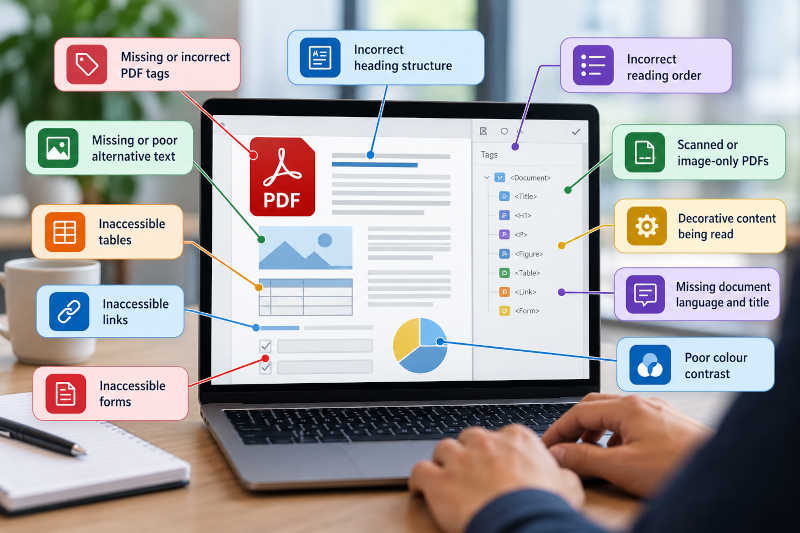
A PDF can look perfectly normal on screen and still contain significant accessibility problems.
Headings may not actually be recognised as headings. Tables can lose their structure. Images may have no text alternative. Content can be presented to a screen reader in the wrong order, and scanned documents may contain no machine-readable text at all.
The good news is that many of these issues can be corrected through PDF accessibility remediation.
But not every problem is the same. Some issues can be repaired directly within the PDF, while others are better addressed in the original Word, PowerPoint, InDesign or other source document.
In this article, we look at some of the most common PDF accessibility problems, how they can be remediated and when professional document remediation services may be appropriate.
What Is PDF Accessibility Remediation?
PDF accessibility remediation is the process of identifying and correcting barriers that can make a PDF difficult or impossible for people with disability to use.
This can include technical problems within the PDF structure, such as incorrect tags or reading order, as well as issues with the way the original document was designed.
Depending on the document, remediation may involve:
repairing the tag structure;
correcting headings;
fixing reading order;
making tables accessible;
adding or improving alternative text;
remediating lists;
repairing links;
improving form accessibility;
applying OCR to scanned content;
setting document properties;
identifying decorative content correctly; and
addressing visual accessibility issues.
The exact work required depends on how the PDF was created and the complexity of the content.
1. Missing or Incorrect PDF Tags
Tags provide the underlying structure that helps assistive technologies understand the content of a PDF.
They can identify elements such as:
headings;
paragraphs;
lists;
tables;
figures;
links; and
form elements.
A PDF may be completely untagged, or it may contain tags that are incorrect, incomplete or poorly organised.
Common problems include:
headings tagged as ordinary paragraphs;
paragraphs incorrectly identified as headings;
content missing from the tag tree;
duplicated tags;
empty tags;
decorative elements included unnecessarily;
incorrectly nested structures; and
tags appearing in an illogical sequence.
These problems can usually be repaired through PDF remediation.
Automatic tagging tools can provide a starting point, but the resulting structure still needs to be reviewed manually.
For a more detailed explanation, see How to Tag a PDF for Accessibility – and Why Tagging Alone Is Not Enough.
2. Incorrect Heading Structure
Headings are important because they help users understand how a document is organised.
A sighted reader may recognise a heading because it is larger, bold or a different colour. Assistive technology generally relies on the underlying structural information.
A document might visually appear to contain a clear hierarchy but actually use ordinary paragraph tags throughout.
Other common heading problems include:
multiple H1 headings where only one is appropriate;
skipped heading levels;
headings used purely for visual styling;
paragraphs incorrectly tagged as headings; and
headings appearing in the wrong order.
During PDF accessibility remediation, the heading structure can be reviewed and corrected so that it more accurately reflects the organisation of the document.
3. Incorrect Reading Order
Reading order is one of the most important accessibility issues in complex PDFs.
A visually designed page may contain:
two or more columns;
text boxes;
sidebars;
captions;
footnotes;
tables;
images; and
callout panels.
A sighted reader can usually determine how these elements are intended to be read.
A screen reader follows the underlying document structure.
If that structure is incorrect, content may be announced in a confusing sequence.
For example, a screen reader might begin in the first column, jump to the footer, move to a sidebar and then return to the main text.
The content itself is technically present, but the experience can become extremely difficult to follow.
Reading-order problems can often be corrected by reorganising the tag structure and reviewing how page content is represented within the PDF.
4. Inaccessible Tables
Tables are one of the most common and technically challenging areas of PDF remediation.
A visual table may be easy to understand because a sighted reader can look across rows and columns.
Someone using assistive technology needs the relationship between headers and data cells to be communicated programmatically.
Common table problems include:
missing table tags;
header cells incorrectly identified as data cells;
missing row or column headers;
incorrectly nested table structures;
merged cells that are difficult to interpret;
multiple levels of headings; and
tables created using spaces or tabs rather than a genuine table structure.
Many table issues can be repaired directly within the PDF.
However, particularly complex tables may be easier and more reliable to correct in the original source document before generating a new PDF.
5. Missing or Poor Alternative Text
Images that communicate meaningful information may require appropriate alternative text.
This can include:
photographs;
charts;
graphs;
diagrams;
maps;
illustrations;
icons; and
infographics.
One common problem is that the image has no alternative text at all.
Another is that alternative text exists but does not communicate anything useful.
For example:
“Graph”
is technically alternative text, but it tells the user almost nothing.
Similarly:
“Blue bar chart with red and green bars”
may describe what an image looks like without explaining the information the chart is intended to communicate.
Effective PDF accessibility remediation can include reviewing images and providing text alternatives that reflect their purpose and context.
Decorative images can also be marked appropriately so that they are not unnecessarily announced by screen readers.
6. Decorative Content Being Read by Screen Readers
Not everything visible on the page needs to be included in the accessible document structure.
Decorative content can include:
background graphics;
borders;
repeated design elements;
page decorations;
visual separators; and
purely ornamental images.
If these elements are incorrectly included in the tag structure, they can create unnecessary noise for someone navigating the document with assistive technology.
During remediation, decorative content can often be marked as an artifact so that it is ignored by screen readers.
This can make the document considerably easier to navigate.
7. Lists That Are Not Properly Structured
A list may look completely normal visually while having no meaningful list structure underneath.
For example, someone may have manually inserted bullet characters before each paragraph rather than creating an actual list.
Assistive technology may then read the content as a series of unrelated paragraphs.
PDF remediation can involve creating or correcting the underlying list structure so that users can identify:
where the list begins;
how many items it contains; and
where each item starts and ends.
Nested lists can require additional attention to ensure their relationships remain clear.
8. Scanned or Image-Only PDFs
Scanned PDFs can present major accessibility barriers.
A document may look as though it contains ordinary text while actually consisting entirely of page images.
A screen reader cannot meaningfully interpret an image of text unless Optical Character Recognition, or OCR, has been applied.
OCR converts scanned text into machine-readable text.
However, OCR is only the first step.
The recognised text may still contain:
spelling errors;
incorrect characters;
missing headings;
no tag structure;
incorrect reading order;
inaccessible tables; and
missing image descriptions.
A scanned document may therefore require both OCR and full accessibility remediation.
9. Inaccessible Links
Links within PDFs can also create accessibility problems.
Common issues include:
links that are not included correctly in the tag structure;
vague wording such as “click here”;
long raw URLs used as link text;
links with no meaningful accessible name; and
visually styled text that looks like a link but is not interactive.
During remediation, links can be reviewed to ensure they are correctly identified and that their wording provides sufficient context.
Descriptive links can be particularly helpful to screen-reader users who navigate through a list of links separately from the surrounding text.
10. Inaccessible PDF Forms
Interactive forms require additional accessibility work.
A PDF form may look straightforward to someone using a mouse but be difficult to navigate using a keyboard or screen reader.
Problems can include:
fields with no accessible label;
confusing tab order;
inaccessible instructions;
required fields that are not identified;
controls that cannot be operated by keyboard;
unclear error messages; and
fields appearing in the wrong position within the document structure.
PDF accessibility remediation can address many of these issues by reviewing field labels, keyboard operation, tab order and the relationship between form controls and surrounding instructions.
11. Missing Document Language
Setting the document language helps compatible assistive technologies determine the correct pronunciation rules.
If the language is missing, a screen reader may not know how the text should be pronounced.
A PDF may also contain sections written in a different language from the rest of the document.
These properties can often be corrected as part of the remediation process.
12. Missing or Incorrect Document Title
A PDF can contain a file name without having a meaningful document title.
For example:
final-report-v7-approved.pdf
may be the file name, but it is not necessarily a useful title.
A meaningful document title can help users understand what they have opened, particularly when working with multiple documents.
Document properties such as title and language are often simple to correct but can easily be overlooked.
13. Problems with Bookmarks and Navigation
Long documents can benefit from bookmarks that allow users to jump directly to major sections.
Annual reports, policy documents, research publications and manuals may become difficult to navigate when users have to move through dozens or hundreds of pages sequentially.
Bookmarks can often be added or repaired during PDF remediation.
However, bookmarks do not replace a meaningful heading structure. Ideally, both should work together to make a long document easier to navigate.
14. Poor Colour Contrast
Some PDF accessibility problems are visual rather than structural.
Text may not have sufficient contrast against its background.
For example:
light grey text on white;
coloured text over photographs;
pale text on coloured panels; or
low-contrast chart labels.
These issues may affect people with low vision or colour-vision deficiencies.
Contrast problems may sometimes be repairable within the PDF, but in many cases it is preferable to change the original source document and regenerate the PDF.
This is particularly true when the PDF has been created from a professionally designed source such as Adobe InDesign.
15. Information Communicated Using Colour Alone
Colour can be useful for communicating information, but it should not generally be the only way that information is conveyed.
For example, a chart might identify:
green as “complete”;
orange as “in progress”; and
red as “overdue”.
Someone who cannot distinguish those colours may have difficulty interpreting the chart.
Additional information might be communicated using:
labels;
patterns;
icons;
text; or
other visual indicators.
Problems like this usually need to be addressed within the source document rather than solely through PDF tagging.
16. Text Embedded in Images
Text that has been converted into an image can create accessibility problems.
Assistive technology cannot interpret text inside an image in the same way that it can interact with real document text.
This is commonly found in:
infographics;
diagrams;
screenshots;
advertisements;
charts; and
designed promotional material.
Depending on the purpose of the image, remediation may involve:
providing an appropriate text alternative;
recreating the text as real document content;
providing a longer description; or
modifying the original source document.
17. Complex Charts and Diagrams
Charts and diagrams can contain information that is difficult to represent with a short alternative-text description.
A simple image may only require a concise description.
A complex chart may need its key findings communicated in surrounding text or through a more detailed alternative.
In some cases, providing access to the underlying data may also be appropriate.
This is an area where professional judgement matters.
The objective is not merely to satisfy an automated checker by filling in an alt-text field. The important question is whether a user can obtain the information the graphic is intended to communicate.
18. Keyboard Navigation Problems
Accessibility does not only concern screen readers.
Some users navigate entirely by keyboard.
Interactive elements such as links and form fields should generally be reachable in a logical order without requiring a mouse.
Problems with keyboard navigation can include:
unexpected tab order;
controls being skipped;
focus moving to unrelated areas;
inaccessible form elements; and
interactive content that cannot be operated from the keyboard.
These issues can often be reviewed and corrected as part of professional PDF remediation.
Can Every PDF Accessibility Problem Be Fixed?
Many problems can be fixed, but the best approach depends on the document.
Some issues can be corrected directly within Acrobat or another specialist PDF remediation tool.
Other problems are better addressed within the original source file.
For example, it may be possible to repair a heading structure directly in the PDF.
But if an entire annual report has poor colour contrast, inaccessible chart designs and text embedded inside graphics, trying to repair everything solely within the finished PDF may be inefficient.
In that situation, the more effective process may be:
correct the source document;
export a new PDF;
remediate the resulting PDF structure; and
test the final document.
Access to the original source files can therefore make a significant difference to a remediation project.
How Do You Know Which Problems Your PDF Has?
The first step is usually an accessibility assessment.
Automated tools can identify many technical problems, but some issues require manual review.
For example, software may be able to tell you whether an image has alternative text.
It cannot reliably determine whether that alternative text actually communicates what the image means.
Similarly, a table may technically contain table tags while still being confusing when navigated with assistive technology.
This is why accessibility testing commonly combines automated checks with manual inspection.
For more information, see How Do You Know if a PDF Is Accessible?.
When Are Professional PDF Remediation Services Recommended?
Simple PDFs may sometimes be remediated internally by someone with the appropriate software and accessibility knowledge.
Professional assistance becomes particularly useful when documents contain:
complex tables;
charts and diagrams;
forms;
scanned content;
multi-column layouts;
large numbers of images;
complicated tag structures;
substantial design accessibility issues;
large page counts;
multiple documents; or
important compliance or publication requirements.
Professional PDF remediation services can also save organisations from having to develop specialist remediation expertise internally for a task they may only encounter occasionally.
PDF Accessibility Remediation from Atomic Web Strategy
Atomic Web Strategy provides professional document remediation services for organisations that need accessible PDFs and digital documents.
We can assist with:
individual PDFs;
reports;
forms;
annual publications;
policies and procedures;
scanned documents;
complex tables;
document collections; and
editable source documents such as Word, PowerPoint and InDesign files.
Our work can include reviewing the existing document, identifying accessibility barriers, remediating the PDF or source file, and completing appropriate accessibility testing.
Where a document contains issues that cannot reasonably be corrected within the PDF alone, we can also identify where changes to the original source document may provide a better outcome.
Need Help Fixing an Inaccessible PDF?
Most PDF accessibility problems can be improved, but the amount of work required varies considerably from one document to another.
A simple text-based PDF may require relatively minor structural corrections, while a designed report containing tables, charts, forms and complex page layouts may require much more detailed remediation.
If you are unsure what accessibility problems are present in your documents, Atomic Web Strategy can review a representative file and advise what is involved.
Visit our PDF and document remediation services page or send us a sample PDF and the editable source file where available.
We can assess the document and provide a clear remediation scope and quotation.
Lets start a Project together!
Request a Free Quote